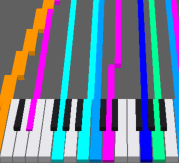
MIDI Source
The object that loads MIDI and acts as the shared source. It does not draw anything itself.
- Its placement defines the MIDI start (t=0), and every
Sharedobject syncs to the timeline at that position. - Note colors are configured here once and shared by the keyboard and all piano rolls.
The usual setup: place one MIDI Source on the timeline, and set the display objects to Source Mode = Shared.
Settings
| Setting | Default | Description |
|---|---|---|
| MIDI File | (empty) | The .mid / .midi file to load |
| Color Mode | Channel | How colors are chosen. Channel = per channel / Track = per track / Channel + Track = combination |
| Ch 1 Color – Ch 16 Color | see below | Display color for each MIDI channel |
Default channel colors
| Ch | Default | Ch | Default |
|---|---|---|---|
| 1 | #3366FF | 9 | #FFCC33 |
| 2 | #FF7E33 | 10 | #33B4FF |
| 3 | #33FF66 | 11 | #FF3333 |
| 4 | #FF3381 | 12 | #33FFB1 |
| 5 | #33FFFF | 13 | #FF33CC |
| 6 | #E433FF | 14 | #4EFF33 |
| 7 | #99FF33 | 15 | #9933FF |
| 8 | #4B33FF | 16 | #E7FF33 |
Color Mode behavior
With Color Mode = Track or Channel + Track, colors are assigned per track / per combination based on Ch N Color. The keyboard, piano rolls, and 3D all use this setting.