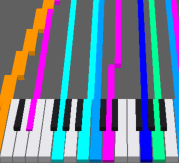
MIDI Piano Roll (CPU / GPU)
Shows notes as rectangles scrolling along time. MIDI Piano Roll (CPU) and MIDI Piano Roll GPU share the same settings and differ only in the rendering method.
Settings
In addition to the common settings (Source Mode / MIDI File / Time Mode / Low Key / High Key):
| Setting | Default | Description |
|---|---|---|
| Direction | Vertical (Down) | Vertical (Down) = falls from the top (X matches the keyboard) / Horizontal (R to L) = flows right to left (each pitch is a lane) |
| Time Mode | Time (sec) | Time axis unit (seconds / beats) |
| Low Key / High Key | 21 / 108 | Pitch range shown (0–127) |
| Roll Window | 6.0 (0.01–120) | Visible time span (seconds). Smaller scrolls faster |
| Playhead % | 85 (0–100) | Playhead line position (from top for vertical / from left for horizontal). ~15% reads well in horizontal mode |
| Note Border | on | Draw a border around note rectangles (helps at high density) |
| Width / Height | 760 / 400 | Render size (px) |
CPU vs GPU
| MIDI Piano Roll | MIDI Piano Roll GPU | |
|---|---|---|
| Rendering | CPU | GPU |
| Settings | same | same |
| Use | general | when you want it light at high density / resolution |
Notes
- Colors come from MIDI Source.
- Place a MIDI Keyboard directly below a
Verticalroll with the sameLow / High Keyto align keys. - Occlusion (skipping fully hidden older same-pitch notes) keeps Black MIDI light. A smaller
Roll Windowis lighter still.